Comparison · 9 min read · June 1, 2026
Fridge Photo Apps vs. Manual Ingredient Entry: Which Way to Plan Dinner Actually Saves More Time?
If you've ever opened a recipe app, stared at a blank ingredient field, and closed it without typing a single thing — you're not alone. The question isn't just which input method is more accurate; it's which one you'll actually use on a Tuesday night when the kale is wilting and dinner needs to happen in 30 minutes. The short answer: fridge photo scanning gets you to a recipe suggestion in under a minute, while manual ingredient entry introduces enough friction to send a measurable chunk of users straight to DoorDash.
- Speed advantage: Fridge photo apps collapse a multi-step entry process into a single tap, while manual entry requires typing, searching, and selecting each item individually.
- AI accuracy: Consumer fridge-scanning apps now report over 95% recognition accuracy for common ingredients, though cluttered shelves and small items still challenge current models [1].
- UX friction cost: Research consistently shows that each additional required form field reduces completion by roughly 10–15%, and reducing fields can increase conversions by 50% or more [3].
- Smart appliance landscape: Samsung's Bespoke AI Family Hub (2026 model) uses Google Gemini-powered AI Vision and an "AI Food Manager" to track, suggest recipes, and flag what's about to expire — but it requires a $2,000+ refrigerator [4].
- Clutter is the enemy: Academic research published in Frontiers in Artificial Intelligence (December 2024) confirms that recognition systems still struggle with "diverse handholding positions and cluttered backgrounds" in real-world fridge scenarios [2].
- The hybrid edge: The best current apps combine a quick photo scan with a one-tap confirmation step — getting you 80–90% of the way there while letting you add edge cases manually in seconds.
| Dimension | Fridge Photo Scan | Manual Ingredient Entry |
|---|---|---|
| Time to first recipe suggestion | ~30–60 seconds | 3–7+ minutes |
| Cognitive load | Very low (tap, snap, confirm) | High (recall + type every item) |
| Accuracy for packaged goods | High (OCR + AI) [4] | Perfect (you typed it) |
| Accuracy for loose produce | Moderate-high; cluttered fridges reduce accuracy [2] | Perfect (you typed it) |
| Works without expensive hardware | Yes (smartphone only) | Yes |
| Handles expiration/spoilage ranking | Yes, with AI inventory layer | Only if app has date-tracking |
| Best for | Weeknight speed, reducing food waste | Meal planning, precise dietary tracking |
TL;DR: For the specific goal of getting a weeknight dinner on the table using what's about to go bad, fridge photo scanning wins on speed and likelihood-of-use — but a smart confirmation step bridges the accuracy gap.
Why Manual Ingredient Entry Is a Bigger Obstacle Than It Feels
The Invisible Tax of Typing Your Fridge Contents
Manual entry feels logical in theory: you know what's in your fridge, you type it, you get recipes. But the cognitive overhead is quietly enormous. You have to remember everything (the half-used can of coconut milk hiding behind the mayo), spell it correctly to match the app's ingredient database, and repeat the process every single day because fridge contents change. This is the same reason people abandon grocery planning apps within the first week — the ritual isn't the cooking, it's the cataloguing.
UX research on form completion gives us hard numbers to frame the problem. Each additional required field reduces form completion by roughly 10–15% [3]. A real-world test found that reducing form fields from 4 to 3 increased conversions by 50%, and going from 11 fields to 4 increased conversions by 120% [3]. Now imagine asking someone to type 12 fridge items after a long workday. The math is brutal: if each field carries a 10% abandonment risk, a ten-item ingredient list could theoretically drop your completion rate to near zero before you even get to a recipe.
What "Friction" Actually Looks Like at 6 PM
The friction isn't just the time (though typing 10–15 ingredients really does take 3–7 minutes for most users). It's the decision fatigue that comes with it. Do you include the sad half-lemon? What about the wilting herbs? Many apps require you to select from a predefined ingredient list — so your "leftover rotisserie chicken" becomes a four-tap search. Per-field UX data shows that even simple fields like phone numbers cause a 6.3% drop-off rate [3]. An open-ended ingredient search field is harder than a phone number field by every measure.
"Each additional required field reduces completion by roughly 10–15%. HubSpot's testing found that reducing form fields from 4 to 3 increased conversions by 50%." — AntForms, Data-Backed Form Abandonment Research [3]
The behavioral consequence for cooking apps is significant: a user who abandons the ingredient-entry flow doesn't get a recipe suggestion — they order out, toss the wilting produce, and feel mildly guilty about both.
The One Use Case Where Manual Entry Wins
To be fair, manual entry earns its place in specific scenarios: batch meal planning on a weekend, tracking precise dietary macros, or managing a pantry inventory over weeks rather than days. If you're building a detailed shopping list or planning lunches for the entire week, the discipline of manually curating your ingredient list pays dividends. But for the weeknight "what do I cook with this stuff" problem, it's the wrong tool.
How Fridge Photo Scanning Actually Works (And Where It Struggles)
The Technology Stack Behind a Single Snap
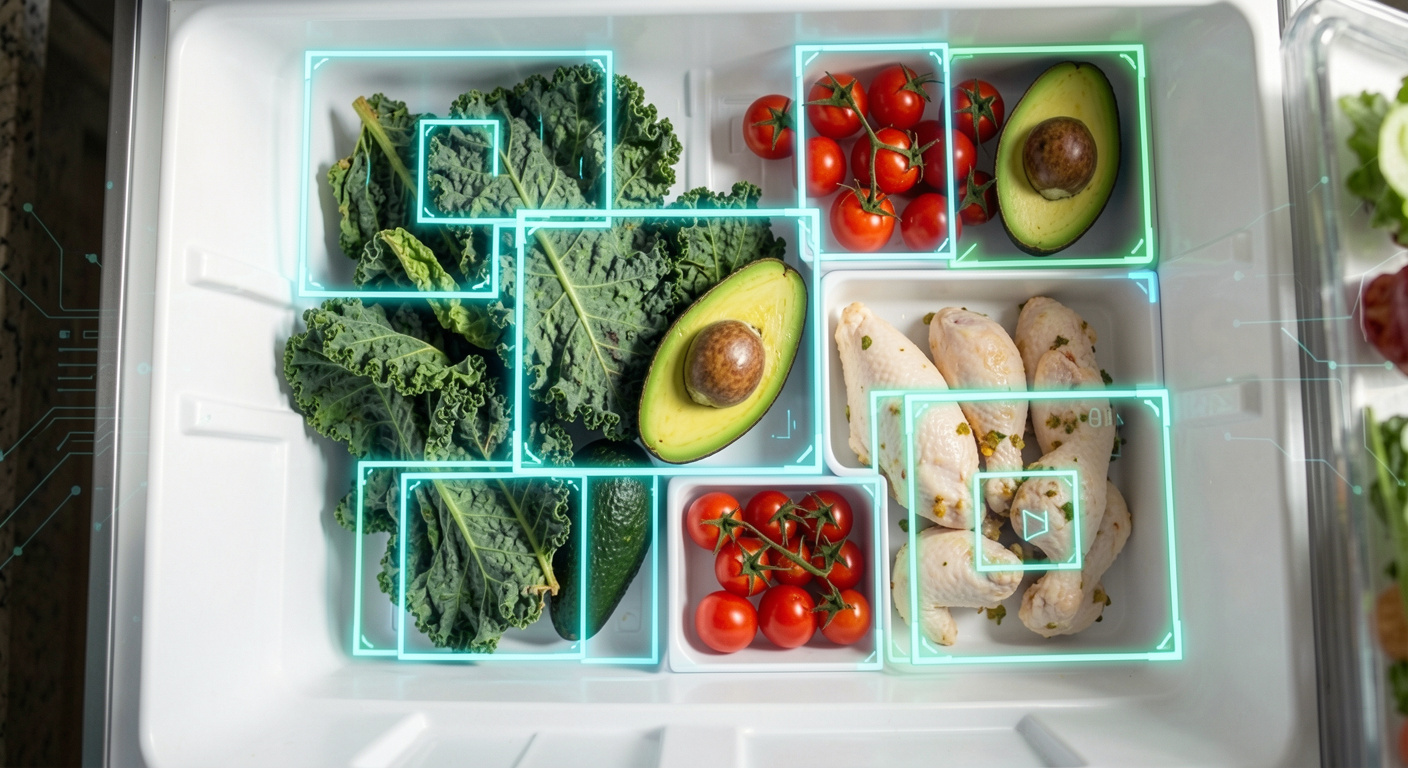
Modern fridge-scanning apps rely on a layered AI stack. At the base is a computer vision model — typically a convolutional neural network or a transformer-based architecture — trained on large datasets of food images. Apps like Fridge Vision AI report training on "millions of food images" and claim over 95% accuracy for common ingredients [1]. For packaged goods, Optical Character Recognition (OCR) adds another layer, reading product labels to identify branded items with high precision — a technique Samsung's Family Hub also employs across global markets [4].
The December 2024 peer-reviewed study published in Frontiers in Artificial Intelligence by researcher Xiaoyan Dai (Kyocera Corporation, Japan) proposed a YOLACT-based deep learning system specifically designed for robust refrigerator food recognition, using enhanced Feature Pyramid Networks (FPN) and data augmentation to handle the real-world variability of fridge environments [2]. The system addressed a core challenge: recognition accuracy degrades at varying camera distances and with cluttered shelf arrangements.
Where Current Systems Still Stumble
Academic research is clear about the remaining gaps. Camera-based systems "often suffer from reduced accuracy at varying distances, especially for small or occluded objects," and struggle with "cluttered backgrounds" and variable lighting inside refrigerators [2]. A spinach bunch buried behind a milk jug may not register. Unpackaged produce — your three remaining asparagus spears, or a quarter of a red cabbage in a bag — is harder to segment than a clearly labeled yogurt container.
Apps have developed practical workarounds. ScanYourFridge, for example, explicitly recommends scanning one ingredient at a time rather than attempting whole-fridge bulk scans, arguing that "one-at-a-time scanning is much more accurate than trying to identify a cluttered fridge" [5]. That's a sensible UX solution, but it shifts the workflow closer to manual entry in terms of time — unless the AI is fast enough per scan to keep the total time under a minute.
The Smart Appliance Premium
For households with the budget, built-in fridge cameras offer the most seamless scanning experience. Samsung's 2026 Bespoke AI Family Hub integrates Google Gemini-powered AI Vision, which allows the internal camera to recognize significantly more food ingredient types than its predecessor [4]. The system's "AI Food Manager" can track ingredients, suggest recipes based on current fridge contents, and send expiration alerts — essentially the full feature set of a dedicated cooking app, built into the refrigerator hardware [4].
Samsung's Family Hub also uses OCR to identify packaged goods across global markets, broadening the recognition range beyond fresh produce [4]. The trade-off: these refrigerators start at prices well north of $2,000, putting the technology out of reach for most home cooks. A smartphone app that delivers comparable intelligence for free — or a modest subscription — is a more democratic solution.
The Hybrid Approach: Why the Best Apps Use Both Methods
Snap First, Confirm Second
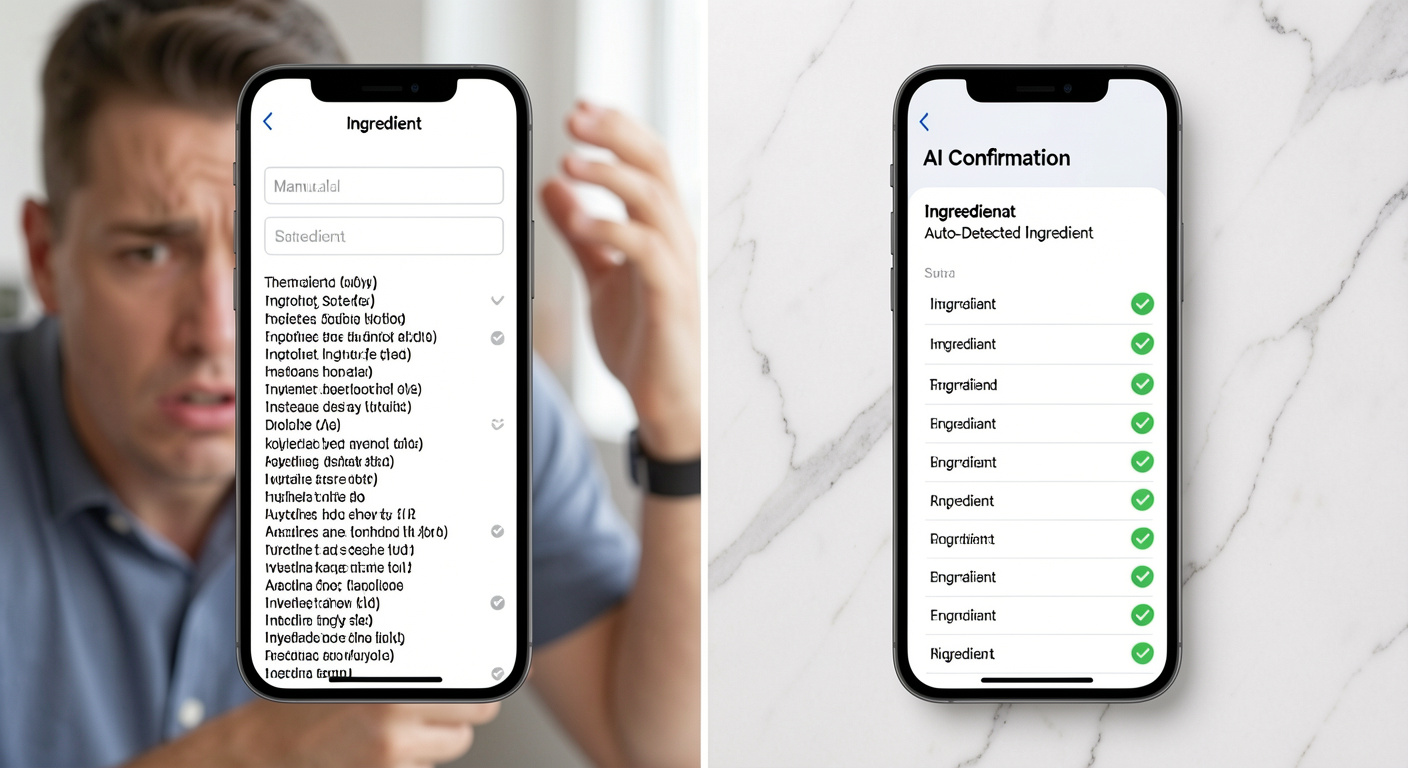
The emerging best practice in fridge-to-recipe apps is a photo-first, confirm-second workflow. You take a photo (or a few), the AI proposes a list of detected ingredients, and you spend 15–30 seconds tapping to confirm, remove, or add edge cases the camera missed. This approach gets the best of both worlds: the speed of AI scanning plus the accuracy of human verification.
ScanYourFridge describes this as: "Take a photo of any ingredient. Our AI identifies it instantly. Confirm detected ingredients. Scan as many as you like — your list saves automatically." [5] The key insight is that confirming a pre-populated list is cognitively much easier than generating one from scratch — the same principle behind autocomplete and smart defaults in good UX design.
For a deeper look at how these workflows intersect with practical meal planning, see our guide on how to actually use up vegetables before they go bad — it pairs naturally with any scanning-based app workflow.
Ranking by "Use It Before It Dies": The Killer Feature
Scanning tells you what you have. The real value — especially for home cooks who are trying to reduce produce waste — comes from what the app does with that information next. A basic recipe search engine returns results based on ingredient match volume. A waste-reduction-focused app ranks suggestions by proximity to spoilage: the recipe that uses up the wilting spinach, the half-avocado, and the day-old cooked chicken beats a recipe that only needs the pantry staples, even if the match count is lower.
This is exactly the workflow described in our roundup of fridge clean-out recipes you can make in 30 minutes on a weeknight: the usefulness of a recipe app scales dramatically when it prioritizes what needs to go tonight over what's purely convenient.
| Feature | Basic Recipe Search | Photo Scan App | Waste-Prioritizing App |
|---|---|---|---|
| Input method | Manual text search | Photo → AI confirm | Photo → AI confirm |
| Ranking logic | Popularity / match count | Ingredient match | Spoilage urgency first |
| Expiration awareness | None | Basic (some apps) | Core feature |
| Time to first suggestion | 5–10 min | 30–60 sec | 30–60 sec |
| Food waste reduction | Low | Moderate | High |
| Useful on weeknights | Rarely | Often | Consistently |
The Real-World Accuracy Number That Matters
Consumer apps like Fridge Vision AI report over 95% accuracy for common ingredients [1], but this figure applies to their best-case training data. In a real fridge — with overlapping items, produce bags, and inconsistent lighting — a more honest planning assumption for bulk scans is 80–90% detection for clearly visible items, with a quick confirmation step catching the rest. For the purposes of weeknight cooking, that's plenty. You don't need to detect every item; you need to detect enough to surface the three most relevant recipes. Missing the dried oregano doesn't ruin the suggestion.
"Automatic food identification utilizing artificial intelligence in smart refrigerators presents an innovative solution. However, achieving consistent high performance in recognition across varying camera distances and diverse real-world conditions remain a formidable challenge." — Xiaoyan Dai, Kyocera Corporation, Frontiers in Artificial Intelligence (December 2024) [2]
Putting It Together: Which Method Should You Use?
The Decision Framework
The right choice depends almost entirely on why you're opening the app:
- Weeknight dinner, high urgency, produce about to turn → Photo scan wins. Speed matters, perfect accuracy doesn't. You need three recipe options in 60 seconds, not a perfectly catalogued pantry.
- Weekly meal prep planning → Manual entry (or hybrid) wins. You want precision, you have time, and the effort pays off across 5–7 planned meals.
- Shopping list building → Manual or barcode scan wins. You're building forward inventory, not assessing current-state urgency.
- Food waste reduction as a primary goal → Photo scan + expiration-aware ranking wins decisively. The scan captures what you have; the ranking surfaces what needs to go first.
For context on just how much a systematic approach to using produce can save you, check out the real cost of produce waste for home cooks — the numbers make a compelling case for switching to a scan-first workflow.
What to Look for in a Fridge-Scanning App
Not all photo-scanning apps are equal. When evaluating one, check for:
- Confirmation step — does it let you edit the AI's detected list before generating recipes?
- Spoilage/expiration ranking — does it prioritize what's about to go bad, or just maximize ingredient overlap?
- Loose produce recognition — can it identify an unpackaged zucchini or bunch of cilantro, not just labeled packages?
- Speed — is the AI processing fast enough to stay under 60 seconds total?
- No forced sign-up — friction before the first value moment kills adoption.
That's the exact combination of features built into our app. Snap a photo of your fridge (or a few shelf-by-shelf shots), confirm the ingredient list in seconds, and get three 30-minute weeknight recipes ranked by what's closest to going bad — not by what's most popular on the internet. If you've been throwing out produce every week wondering what happened to your best intentions, it's worth trying for free.
Frequently asked questions
How accurate are fridge photo scanning apps at recognizing ingredients?▾
Consumer fridge-scanning apps report over 95% accuracy for common ingredients under good conditions. However, peer-reviewed research published in Frontiers in Artificial Intelligence (December 2024) notes that real-world accuracy drops when dealing with cluttered shelves, small or partially hidden items, and variable lighting inside fridges. For weeknight cooking purposes, a confirmation step after scanning effectively closes the accuracy gap.
Do I need a Samsung Family Hub or smart fridge to use AI ingredient scanning?▾
No. While Samsung's Bespoke AI Family Hub and similar smart refrigerators have built-in cameras and AI ingredient recognition, there are several free and low-cost smartphone apps — including Fridge Vision AI and ScanYourFridge — that deliver comparable scanning features using only your phone's camera, with no expensive hardware required.
Why is manual ingredient entry so frustrating to use consistently?▾
UX research shows that each additional required form field reduces completion rates by roughly 10–15%. Typing out a full fridge inventory — which might involve 10–15 items — introduces enough friction that many users abandon the process before getting a recipe suggestion, especially on busy weeknights. The cognitive load of recalling and typing every item is also a significant barrier.
What is the fastest way to go from fridge contents to a dinner recipe?▾
The fastest reliable workflow is: snap one to three photos of your fridge shelves, let the AI detect ingredients (typically 10–30 seconds of processing), spend 15–30 seconds confirming or editing the list, then get recipe suggestions. This entire flow takes under 90 seconds in well-designed apps, compared to 3–7 minutes of manual entry.
Can fridge-scanning apps help reduce food waste?▾
Yes, especially when the app ranks recipe suggestions by spoilage urgency rather than just ingredient match count. By surfacing recipes that use your most time-sensitive produce first, scanning apps help you plan meals around what needs to be eaten tonight — before it ends up in the bin.
What's the difference between fridge photo scanning and barcode scanning?▾
Barcode scanning reads the UPC code on packaged goods (canned goods, yogurt, condiments) and is highly accurate for labeled products, but it can't identify fresh produce, leftovers, or any item without a barcode. Fridge photo scanning uses computer vision to identify items visually, making it the only method that works for fruits, vegetables, and unpackaged foods — the items most likely to go to waste.
Sources
- Fridge Vision AI — Turn ingredients into delicious meal ideas
- Robust deep-learning based refrigerator food recognition — Frontiers in Artificial Intelligence (December 2024)
- How to Reduce Form Abandonment Rate: 12 Data-Backed Strategies — AntForms
- Samsung Unveils 2026 Bespoke AI Family Hub Refrigerator — SammyGuru
- ScanYourFridge - AI Recipe Finder | Cook with What You Have
- Samsung Expands AI Capabilities of Bespoke AI Refrigerator Family Hub — Samsung Newsroom
- Editorial: Defining the Role of Artificial Intelligence in the Food System — PMC / Frontiers in Nutrition
- TOP 20 Multi-Step Form Abandonment Stats 2026 — Amra & Elma
Keep reading
Ready to see it for yourself?
Back to home →